Microsoft recently released a Windows update that adds new security protections for Remote Desktop (.RDP) connections. Because of this update, you may now see a new warning screen when launching your Remote Desktop connection.
This is expected, safe, and not a problem with your account or our server.
? Why This New Screen Appears
Microsoft introduced new protections to prevent attackers from sending fake or malicious RDP files. These protections help block phishing attempts where a user might be tricked into opening a harmful connection.
Because most organizations (including ours) use standard, unsigned RDP files, Windows now shows a one‑time warning before allowing the connection.
You may see messages such as:
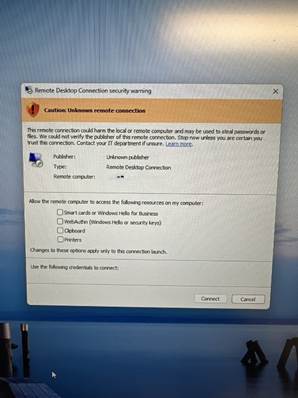
- “Caution: Unknown remote connection”
- “We could not verify the publisher of this remote connection.”
This does not mean the connection is unsafe — it simply means Windows is being more cautious after the recent update.
? What You Will See
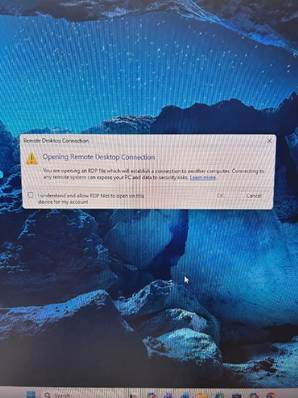
You may see a screen similar to these when opening your Remote Desktop connection:
This is part of Microsoft’s new security requirements.
✅ What You Should Do
When this screen appears:
- Click “Connect.”
This is the correct and expected action. - Optional:
If you want to use your local clipboard (copy/paste) or printers inside the Remote Desktop session, you may check those boxes before clicking Connect.
After you click Connect, the warning should not appear again for this connection unless Windows resets its security settings.
? What Changed (Technical Summary)
Microsoft’s April 2026 update added:
- A new warning screen for unsigned RDP files
- A one‑time educational prompt about RDP security
- Resource redirection (printers, clipboard, smart cards) now disabled by default
- Additional protections against malicious RDP files used in phishing attacks
These changes affect anyone who launches Remote Desktop using an RDP file, which is how you connect to the Remote Desktop/Cloud Server. This is an expected result from the Windows update on your local PC.
Was this article helpful?
That’s Great!
Thank you for your feedback
Sorry! We couldn't be helpful
Thank you for your feedback
Feedback sent
We appreciate your effort and will try to fix the article